Configuring the PostgreSQL Database for Use by a NOSUPERUSER (Required When Installing Syteca 7.23+)
If a manually-created PostgreSQL database is used, when installing Syteca version 7.23 (or higher), or updating to Syteca version 7.23 (or higher) from a version prior to 7.23, a PostgreSQL database user with NOSUPERUSER privileges now requires extra privileges (that a user with SUPERUSER privileges has granted them), to allow them to use a foreign server.
The PostgreSQL user with NOSUPERUSER privileges will see the following message in a popup window when installing Syteca Application Server 7.23 (or higher):
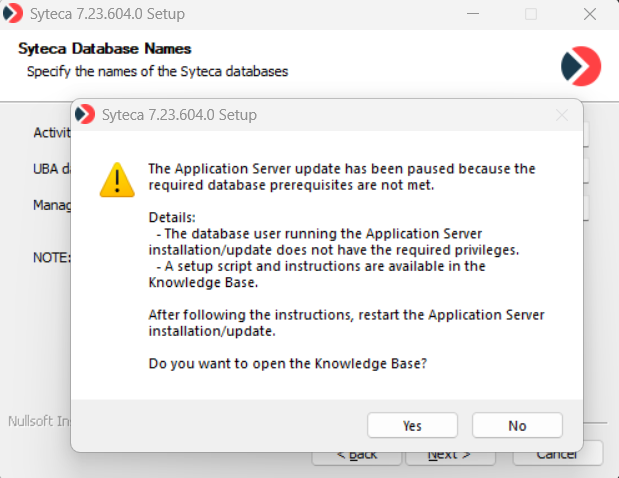
For the the PostgreSQL user with NOSUPERUSER privileges to be able to proceed with the installation (after seeing the popup above), depending on whether you are updating or installing the Application Server, as a user with SUPERUSER privileges, one of the scripts below first needs to be run for the "ekranactivitydb" database.
1. When updating Syteca to version 7.23 (or higher), run the following script as a user with SUPERUSER privileges:
Updating to Syteca 7.23 (or higher)
CREATE EXTENSION IF NOT EXISTS postgres_fdw;

CREATE SERVER IF NOT EXISTS mngdbserver FOREIGN DATA WRAPPER postgres_fdw OPTIONS(host '<postgres_server_hostname_or_IP_address>', dbname '<Syteca_management_database_name>', port '5432', use_remote_estimate 'true');

GRANT USAGE ON FOREIGN SERVER mngdbserver TO <nosuperuser_name>;

ALTER SERVER mngdbserver OWNER TO <nosuperuser_name>;
Where:
- "<postgres_server_hostname_or_IP_address>" is the PostgreSQL server where the Syteca management database is located.
- "<Syteca_management_database_name>" is the name of the Syteca management database.
- "<nosuperuser_name>" is the PostgreSQL user with NOSUPERUSER privileges.
2. When installing Syteca version 7.23 (or higher) from scratch (i.e. clean install), as a user with SUPERUSER privileges:
Before installing Syteca, the PostgreSQL database required by Syteca first needs to be configured as described on the Configuring the PostgreSQL Database page (by running the script in "Step 11. Grant Extra Privileges for the User (from Syteca version 7.23 Only)").