Syteca Application Credentials Broker (ACB)
NOT AVAILABLE IN SAAS
Table of Contents
1. Introduction
Syteca Application Credentials Broker (ACB) is a stand-alone component of Syteca that is used for integrating a customer’s IT system with Syteca by using the Syteca ACB API.
This application is designed to allow customers to get, add, and manage the data from Syteca secrets (and from the folders they are stored in) via the ACB API, in order to use for their own business purposes.
The Syteca ACB API can also be used to rotate the password of the default "admin" user of Syteca via an external application.
2. System Requirements
First make sure that the following system requirements are met, and then download the latest version of the installation file.
• Windows Server 2022 or Windows Server 2019 [Recommended], Windows Server 2019 Core, Windows Server 2016, Windows Server 2012, or Windows 10. Both the x86 and x64 platforms are supported.
• IIS 7.5 or higher.
NOTE: Please refer to the Syteca Quick Start Deployment Guide to:
- Turn on Internet Information Services (IIS).
- Configure Internet Information Services (IIS).
• ASP.NET Core 8.0 Runtime (v8.0.12) - Windows Hosting Bundle or higher.
• Syteca Application Server 7.23 or higher when using ACB version 1.3 (or Syteca Application Server 7.22 or higher if using ACB 1.2, or Syteca Application Server 6.41.1 or higher if using a version prior to ACB 1.2).
3. Installation
The latest version (ACB 1.3) of the installation file can be downloaded from the syteca.com website: https://download.syteca.com/Syteca_ACB.zip
Run this file to open the installation wizard, which will guide you through the installation process.
4. Adding a User Account in the Management Tool
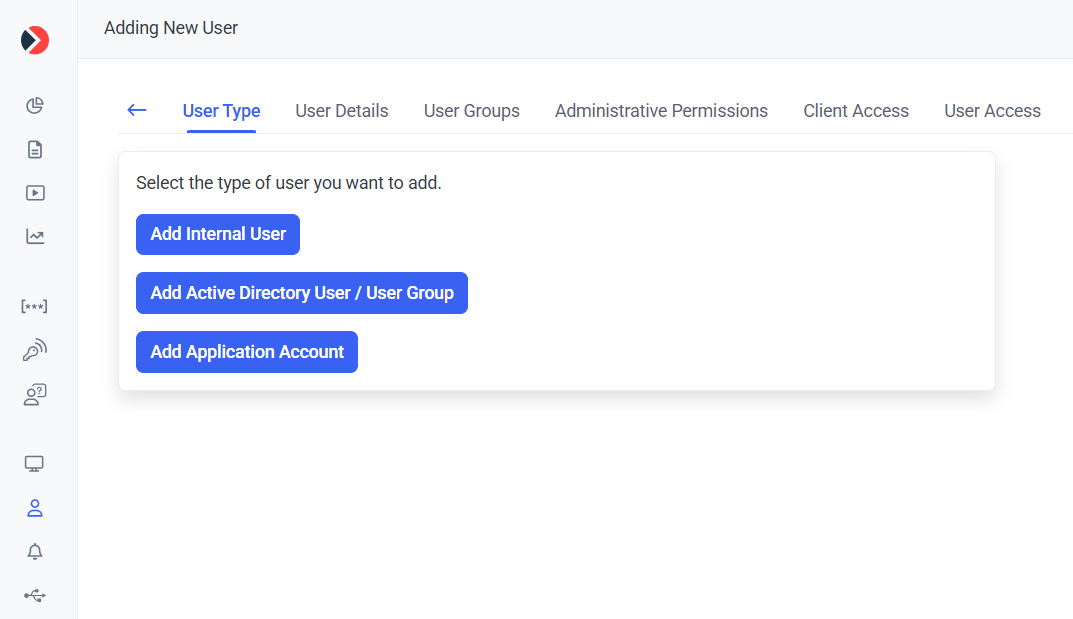
To be able to use the Syteca ACB API, you need to first create a user account of any type (except an Active Directory user group) on the Users page, by clicking the Add User button (in the top right of the page (where the user must have the administrative User Management permissions to do this).
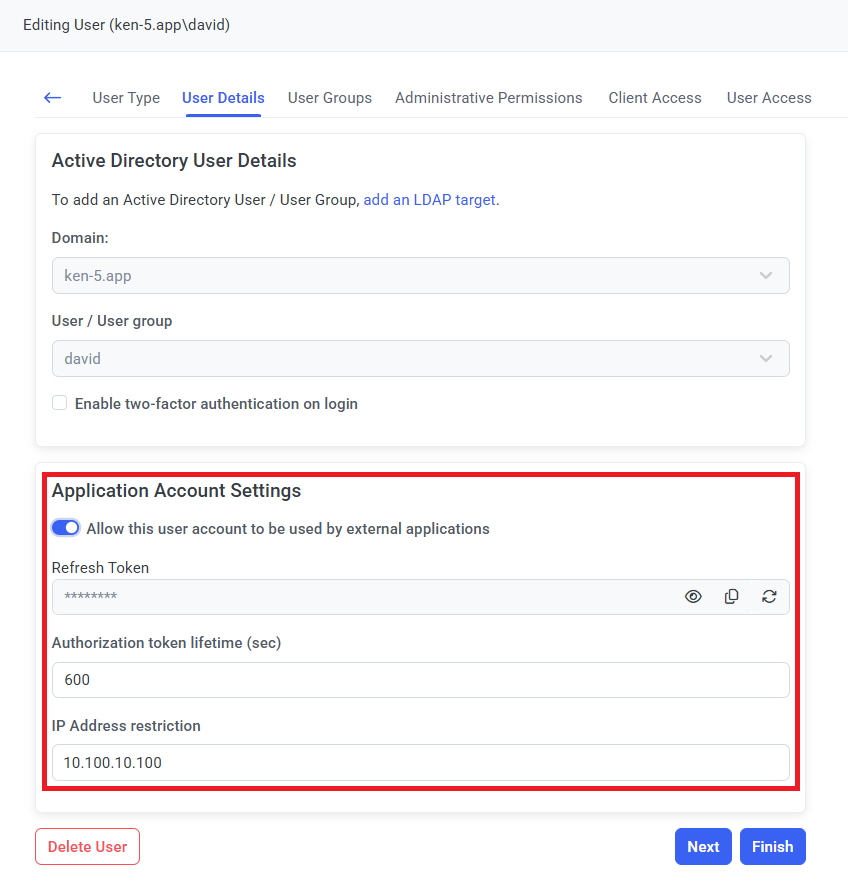
Then while either editing/adding an Internal user or an Application Account user, or editing an Active Directory user, in the Application Account Settings section, you will get (and can copy) a Refresh Token, which is required for getting the Access Token that will be used for accessing the secrets' data.
Optionally, you can also specify the Authorization token lifetime (which defines how long the Access Token will be valid after receiving it) and an IP Address restriction to allow the account to only be used from a specific IP address.
NOTE: The default value of the Authorization token lifetime is "600" seconds, and if you specify a value of "0", the Access Token will never expire.
5. Editing Secret (and Folder) Permissions for the Account
NOTE: The user account added (above) must have the administrative Privileged Accounts Management permission and a PAM seat license assigned to them, and the Password Management application (with the Automation feature) must be enabled in the product license serial key to be able to open the Automation tab (in the Edit Secret and Edit Folder pop-up windows).
After the user account has been created, it needs to be added as a User on the Permissions tab (with the Owner, Editor, or PAM User Role Type permissions required - see below) of the secrets and folders that it needs to access.
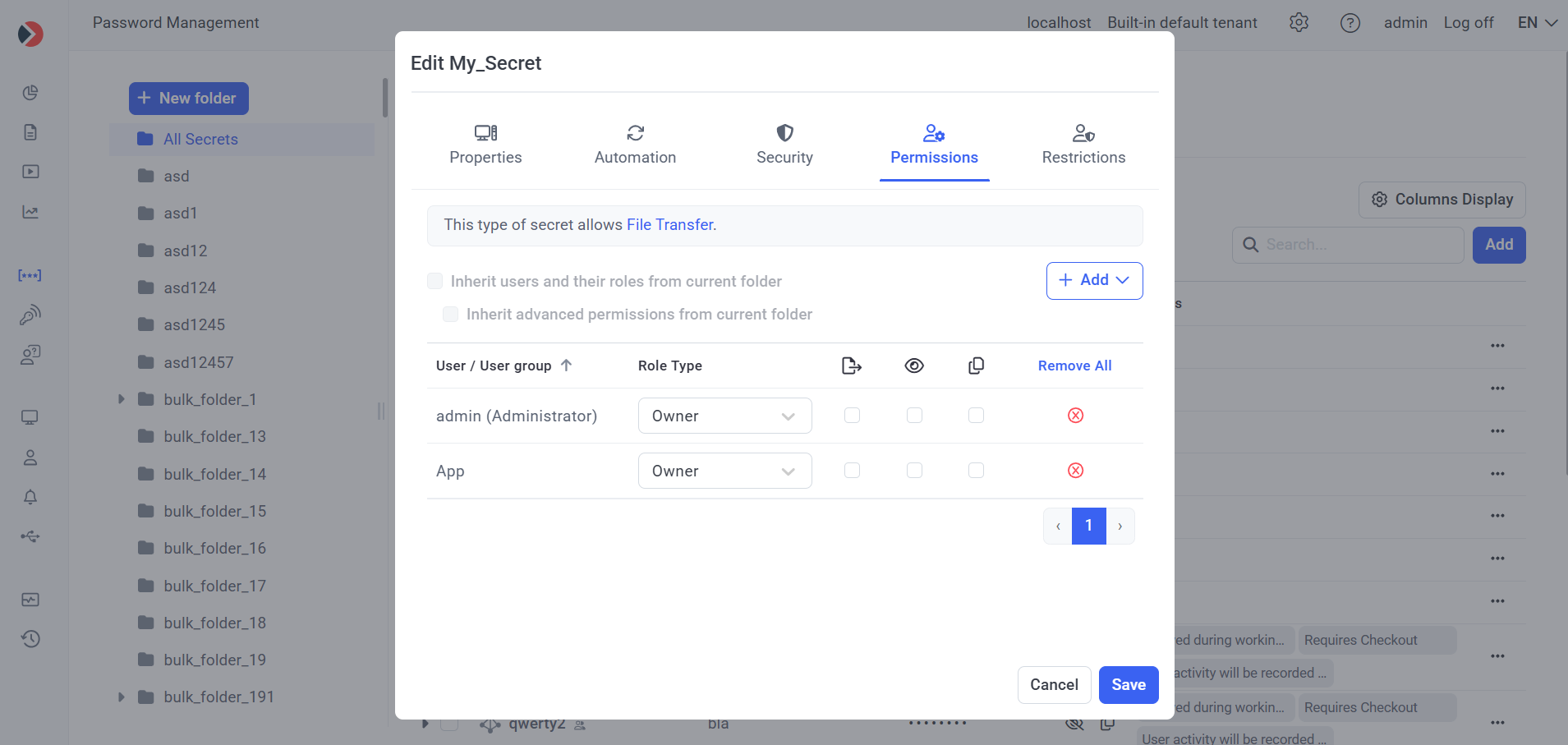
The different Role Type permissions allow the user to perform the following functions with a secret (or with the secrets stored in a folder in the Tree-View folder structure):
1) A user with the PAM User role can:
- get the ACB Access Token.
- get the secret's data (partially limited for the PAM User role) by calling the get_secret_details (old - see below) endpoint, or the GetSecret (new - see below) endpoint.
- get the folder's data (partially limited for the PAM User role), by calling the GetFolder endpoint.
2) A user with the Editor role can:
- get the ACB Access Token.
- get the secret's data, by calling the get_secret_details (old - see below) endpoint, or the GetSecret (new - see below) endpoint.
- get the folder's data, by calling the GetFolder endpoint.
- update the folder/secret by calling the UpdateFolder/UpdateSecret endpoint (except setting a user's Role Type permissions to the Owner role).
- rotate the secret’s password (or SSH key) by calling the RotateSecretPassword endpoint.
- force check in of the secret's password (or SSH key) by calling the ForceCheckIn endpoint.
3) A user with the Owner role can:
- get the ACB Access Token.
- get the secret's data by calling the get_secret_details (old - see below) endpoint, or the GetSecret (new - see below) endpoint.
- get the folder's data, by calling the GetFolder endpoint.
- update the folder/secret by calling the UpdateFolder/UpdateSecret endpoint.
- rotate the secret's password (or SSH key) by calling the RotateSecretPassword endpoint.
- delete the folder/secret by calling the DeleteFolder/DeleteSecret endpoint.
- force check in of the secret's password (or SSH key) by calling the ForceCheckIn endpoint.
NOTE: For the new (see below) endpoints, when a user creates a new folder/secret by calling the AddFolder/AddSecret or BulkAdd endpoint, they are automatically granted the Owner role (by default) for the secrets/folders created (i.e. if not specifically modified in the "permissions" property).
NOTE: New secrets and folders are created in the user’s tenant (i.e. in the tenant where the user account was added - see Section "4. Adding a User Account in the Management Tool" above).
NOTE: The default "admin" user of the system has the Owner role for all secrets and folders created via the new (see below) endpoints (even if the default "admin" user is not added to the list of users on the Permissions tab of a secret or folder).
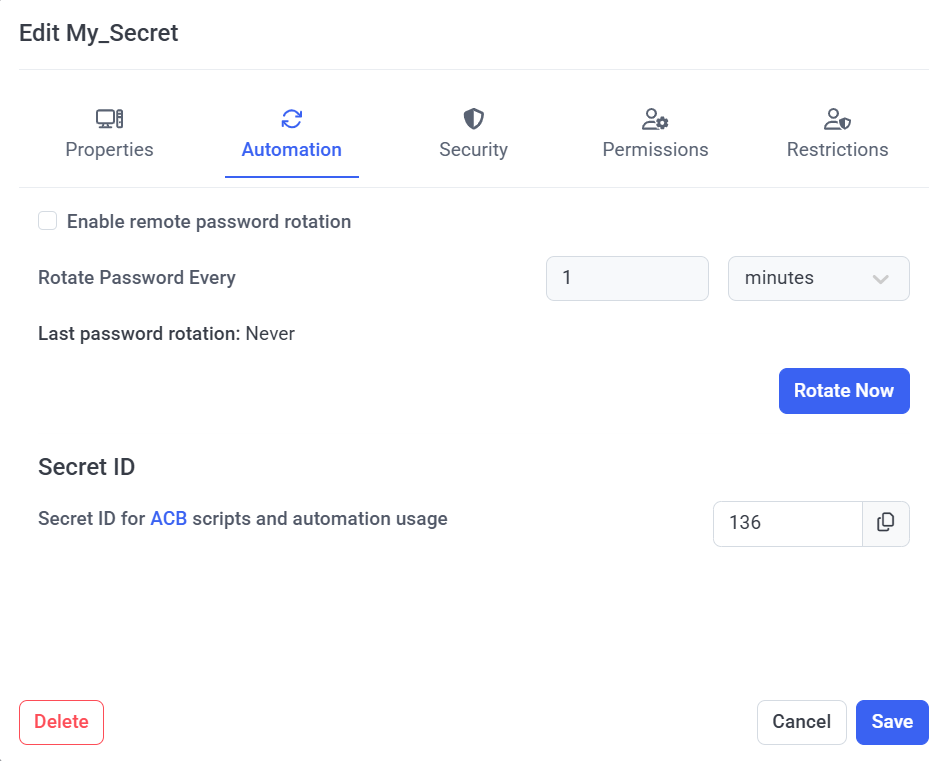
The Secret ID of an existing secret can be viewed (and copied) while editing a secret, on the Automation tab (where the Secret ID is required to use the ACB API, for getting and managing the secret's data).
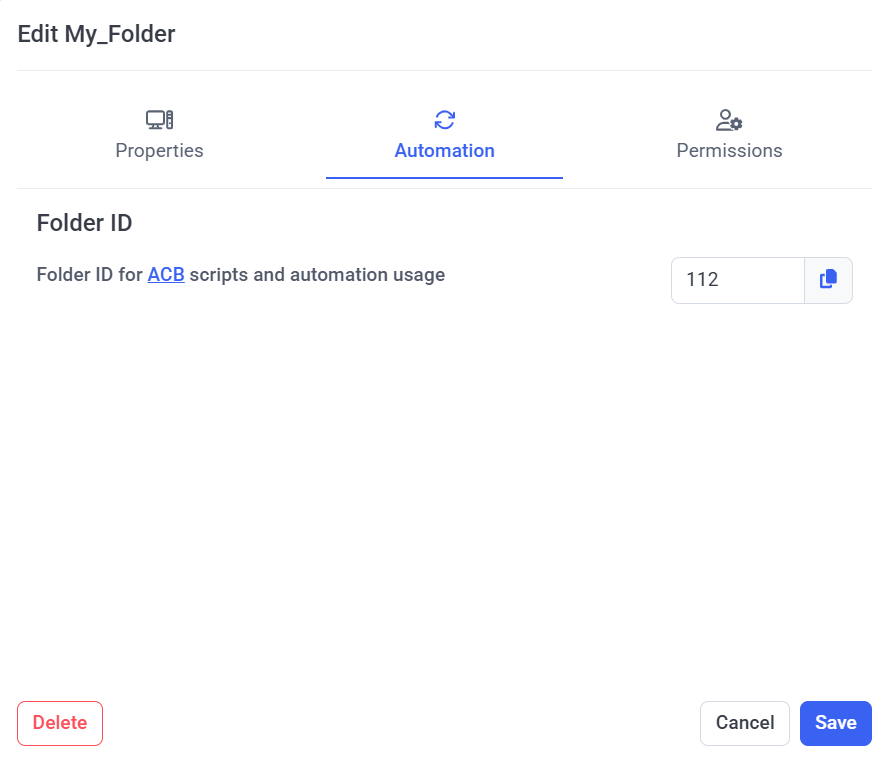
Similarly, the Folder ID of an existing folder can be viewed (and copied) while editing a folder, on the Automation tab (where the Folder ID is also required to use the ACB API, for getting and managing the folder's data).
6. The Syteca ACB API
After installing the Syteca ACB service on a web server machine (please also refer to Section 2. System Requirements above), you can start using the ACB API with any HTTP/HTTPS client.
6.1. Old ACB Endpoints
The 2 old ACB endpoints (described in the following table), which were added prior to ACB version 1.3 (after which the number of endpoints was extended significantly with new endpoints - see below), use a different approach with an Access Token (instead of an Authorization header), and are therefore handled differently to all the other (new) endpoints.
Request URL: https://<hostname>/SytecaACB/<request_name>
NOTE: If ACB was updated from a version prior to 1.2, "SytecaACB" needs to be replaced by "EkranACB" in the Request URL above.
Request Name | Description | Type | Request Parameters in JSON Body | Response | |||
| Name | Required | Description | Data | Description | |||
get_access_token | Returns the Access Token. | POST | refreshToken | Yes | The Refresh Token of the user. | <access_token> | The Access Token with a limited lifetime to get the properties for secrets available. |
| get_secret_details | Returns the json data with the secret's properties. | POST | accessToken | Yes | The Access Token, received via the get_access_token request. | Secret properties:
| The json data with the secret's properties. |
| secretId | Yes | The identifier (number) of the secret, whose properties need to be received. NOTE: The Secret ID can be copied from the Management Tool, while editing a secret on the Automation tab (see above). | |||||
Examples of queries using the cURL utility:
curl -X POST "https://localhost/SytecaACB/get_access_token" -H "accept: */*" -H "Content-Type: application/json" -d "{\"refreshToken\":\"Vs7yGDEJGU8DLovudELezwMEZqFZ4nOcpjtrvNIlZbETWJCz5xH7FZOImYeFkeaW\"}"
curl -X POST "https://localhost/SytecaACB/get_secret_details" -H "accept: */*" -H "Content-Type: application/json" -d "{\"accessToken\":\"u)_MM*vCYn8GY;In|!@S%XvfWSi5-|@pC|PASoOA_b49N{j(V2htXIPlHK8v+YPJ\",\"secretId\":1}"
NOTE: If ACB was updated from a version prior to 1.2, "SytecaACB" needs to be replaced by "EkranACB" in the queries above.
6.2. New ACB Endpoints
The new endpoints (described in the tables below), which were added in ACB version 1.3, use an Authorization header (instead of an Access Token), and are therefore handled differently to the old endpoints (described in the table above).
6.2.1. Folder Endpoints
The following (new) folder endpoints are available:
Name | Description | Type & URL | Request Body Parameters | Response | |||
Name | Type | Required | Description | ||||
AddFolder | Creates a new folder. | POST /folders | name | string (256) | Yes | The unique name of the folder. | 201 Created. See the Folder Response Model. |
description | string | No | The folder description. | ||||
parent_folder_id | int | No | The ID of the parent folder. | ||||
parent_folder_name | string | No | An alternative property for specifying the parent folder if the ID is unknown or not yet created (e.g. folders created during bulk operations). | ||||
permissions | See the Permissions data model. | No | The folder permissions. | ||||
UpdateFolder | Updates the folder by its ID. | PATCH /folders/{id} | name | string (256) | Yes | The unique name of the folder. | 200 OK. See the Folder Response Model. |
description | string | No | The folder description. | ||||
parent_folder_id | int | No | The ID of the parent folder. | ||||
parent_folder_name | string | No | An alternative property for specifying the parent folder if the ID is unknown or not yet created (e.g. folders created during bulk operations). | ||||
permissions | See the Permissions data model. | No | The folder permissions. | ||||
DeleteFolder | Deletes the folder by its ID. | DELETE /folders/{id} | - | 204 No Content. | |||
GetFolder | Returns the json object with the folder's details. | GET /folders/{id} | - | 200 OK. See the Folder Response Model. | |||
NOTES:
- It is not required to specify all the folder properties in the UpdateFolder endpoint (where if a property is not specified, it is not modified).
- To clear a property value, set the value “null”, e.g. to clear the description value, use { description: null }.
6.2.2. Secret Endpoints
The following (new) secret endpoints are available:
Name | Description | Type & URL | Request Body Parameters | Response | |||
Name | Type | Required | Description | ||||
GetSecret | Returns full information about the secret (except the secret's password). | GET /secrets/{id} | - | 200 OK. See the Secret Response Model. | |||
GetSecretCredentials | Returns basic information about the secret, such as the host, password, and name. This is a copy of the old get_secret_details endpoint, but with the Authorization header instead of the access_token query parameter. | GET /secrets/{id}/password | - | 200 OK. Secret properties:
| |||
AddSecret | Creates a new secret. | POST /secrets/ | name | string (512) | Yes | The unique Secret Name. | 201 Created. See the Secret Response Model. |
type | See Secret Types. | Yes | The secret Type. | ||||
description | string | No | The secret Description. | ||||
parent_folder_id | int | No | The ID of the parent folder | ||||
parent_folder_name | string | No | An alternative property for specifying the parent folder, if the ID is unknown, or not yet created (e.g. secrets and folders created during bulk operations). | ||||
domain | string | Yes (for Active Directory account secrets only). | The Domain (for Active Directory accounts only). | ||||
computer_name | string | Yes (for Windows account, Unix account (SSH), and Unix account (Telnet) secrets only). | The Computer name (for Windows, Unix SSH and Unix Telnet accounts only). | ||||
url | string | Yes (for Web account secrets only). | The URL (for Web accounts only). | ||||
server | string | Yes (for MS SQL account secrets only). | The SQL Server name (for MS SQL accounts only). | ||||
login | string | Yes | The Login name. | ||||
password | See the PasswordData data model. | Yes (except for Unix account (SSH) secrets with an SSH key). | The Password value. | ||||
ssh_key | See the SshKey data model. | No | The SSH key value (for Unix SSH accounts only). | ||||
computers | string[] | No | A list of Specific computers for which connections will be allowed (for Active Directory accounts only). | ||||
file_transfer | See the FileTransfer data model. | No | The File Transfer settings (for Windows, Active Directory, and Unix SSH accounts only). | ||||
rotation | See the Rotation data model. | No | The Remote password rotation settings (default: false). | ||||
record_activities | bool | No | The Record user activity while the secret is in use settings. | ||||
check_out | See the CheckOut data model. | No | The Password Checkout settings. | ||||
require_approval | See the RequireApproval data model. | No | The Require approval (for secret usage) settings. | ||||
permissions | See the Permissions data model. | No | The secret’s Permissions. | ||||
UpdateSecret | Updates the secret by its ID. | PATCH /secrets/{id} | name | string (512) | No | The unique Secret Name. | 200 OK. See the Secret Response Model. |
description | string | No | The secret Description. | ||||
parent_folder_id | int | No | The ID of the parent folder. | ||||
parent_folder_name | string | No | An alternative property for specifying the parent folder, if the ID is unknown, or not yet created (e.g. the secrets and folders created during bulk operations). | ||||
domain | string | No | The Domain (for Active Directory accounts only). | ||||
computer_name | string | No | The Computer name (for Windows, Unix SSH and Unix Telnet accounts only). | ||||
url | string | No | The URL (for Web accounts only). | ||||
server | string | No | The MS SQL Server name (for MS SQL accounts only). | ||||
login | string | No | The Login name. | ||||
password | See the PasswordData data model. | No | The Password value. | ||||
ssh_key | See the SshKey data model. | No | The SSH key value (for Unix SSH accounts only). | ||||
computers | string[] | No | A list of Specific computers for which connections will be allowed (for Active Directory accounts only). | ||||
file_transfer | See the FileTransfer data model. | No | The File Transfer settings (for Windows, Active Directory, and Unix SSH accounts only). | ||||
rotation | See the Rotation data model. | No | The Remote password rotation settings (default: false). | ||||
record_activities | bool | No | The Record user activity while the secret is in use settings. | ||||
check_out | See the CheckOut data model. | No | The Password Checkout settings. | ||||
require_approval | See the RequireApproval data model. | No | The Require approval (for secret usage) settings. | ||||
permissions | See the Permissions data model. | No | The secret’s Permissions. | ||||
DeleteSecret | Deletes the secret by its ID. | DELETE /secrets/{id} | - | 204 No Content. | |||
RotateSecretPassword | Rotates the specified secret’s password (equivalent to the Rotate Now button in the Management Tool). | POST /secrets/{id}/rotate-secret-password | - | 204 No Content. | |||
ForceCheckIn | Equivalent to the Force Check In button in the Management Tool. | POST /secrets/{id}/force-checkin | - | 204 No Content. | |||
NOTES:
- The password is passed in an open format, and must be specified in the password property.
- It is not required to specify all the properties in the UpdateSecret endpoint (in case, a property is not specified, its value is not modified), and if you need to clear any property value, set it to "null", e.g. if you want to clear the description value pass { description: null }.
- Each type of secret has required and ignored properties for the AddSecret endpoint:
- If a required property is not passed, a 400 Bad Request status code is returned with information about the missing required property. The required properties for the different secret types are as follows:
Secret Type | List of Required Properties |
Active Directory account | name, type, login, password, domain |
Windows account | name, type, login, password, computer_name |
Unix account (SSH) | name, type, login, password or ssh_key, computer_name |
Unix account (Telnet) | name, type, login, password, computer_name |
MS SQL account | name, type, login, password, server |
Web account | name, type, login, password, URL |
- For Unix account (SSH) secrets, the user can pass either the password or ssh_key property, as follows:
- If the password property is set, the Unix account (SSH) secret is created with the Use password option.
- If the ssh_key property is set, the Unix account (SSH) secret is created with the Use SSH key option.
- If both the password and ssh_key properties are set, the secret is created with the Use SSH key option, while the password property is ignored.
- If an ignored property is passed, the system does not take the value into account, and does not validate it, where the ignored properties for the different secret types are as follows:
Secret Type | List of Ignored Properties |
Active Directory account | computer_name, server, url |
Windows account | server, url, domain |
Unix account (SSH) | server, url, domain |
Unix account (Telnet) | server, url, domain |
MS SQL account | computer_name, url, domain |
Web account | computer_name, server, domain |
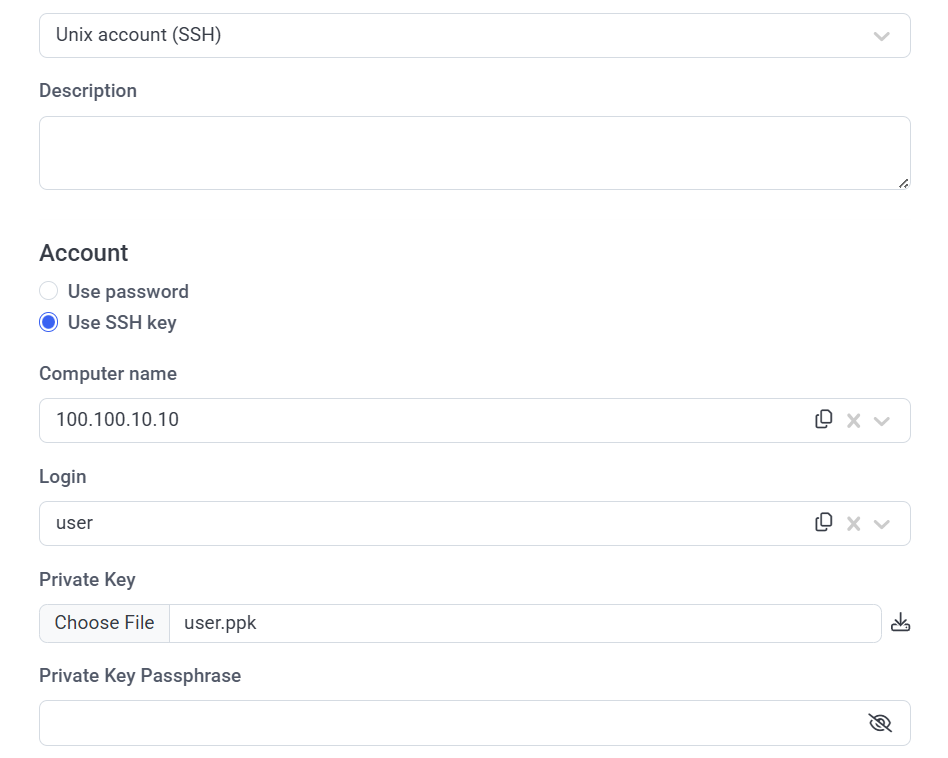
- To create a Unix account (SSH) secret with an SSH key, the user needs to set the ssh_key property according to the SshKey data model, where private_key is the private key value stored in the .ppk file.
In the Management Tool, while editing a Unix account (SSH) secret with an SSH key, in the Private Key field, the following template file name is displayed as "<login>_key.ppk". A user with the Owner role can download this file from the Management Tool (where the system does not store the file with the private key value, but only the file name and key value, and when the user tries to download the key (by clicking the Download icon), this file is created with the template name by default).
6.2.3. Bulk Action Endpoints
The following (new) bulk action endpoints are available:
Name | Description | Type | Request Body Parameters | Response | |
Name | Description | ||||
BulkAdd | Bulk action creation of secrets and folders endpoint. | POST /secrets/bulk | folders | An array of the AddFolder request model. | 200 OK. { |
secrets | An array of the AddSecret request model. | ||||
NOTES:
- The password must be specified for each secret in the password property.
- The error messages contain the names of the secrets and/or folders where the error occurred, in the following format: <name>: <error message>, e.g. "WinSecret: A secret with this name already exists.".
6.3. Data Models
Secret Types:
• ADAccount - an Active Directory account secret type.
• WindowsAccount - a Windows account secret type.
• UnixAccountSSH - a Unix account (SSH) secret type, with an SSH connection.
• UnixAccountTelnet - a Unix account (Telnet) secret type, with a Telnet connection.
• WebAccount - a Web account secret type.
• MSSQLAccount - an MS SQL account secret type.
6.3.1. The "Permissions" Data Model
Property | Type | IsRequired | Description | Default Value |
inherit_users_and_roles | bool | No | Inherits users and their roles from the parent folder. | false |
inherit_features | bool | No | Inherits advanced permissions from the parent folder. | false |
users | See the Permission[] data model. | No | A list of the permissions of users. | [] |
user_groups | See the Permission[] data model. | No | A list of the permissions of user groups. | [] |
6.3.2. The "Permission" Data Model (for User / User Groups)
Property | Type | IsRequired | Description | Default Value |
name | string | Yes | The name of the user that has the permissions. | - |
access_type | Owner | Editor | PAM User | Yes | The permissions type. | PAM user |
features | See the AdditionalFeature[] data model. | No | A list of the features available. | [] |
6.3.3. The "AdditionalFeature" Data Model
• copyPassword - allows the user to copy the password.
• viewPassword - allows the user to view the password.
• fileTransfer - allows the user to use the File Transfer feature.
6.3.4. The "FileTransfer" Data Model
Property | Type | IsRequired | Description | Default Value |
protocol | string | Yes | The file transfer protocol (SFTP, FTP, or SCP). | SFTP |
port | int | Yes | The port number (in the range 0-65535). | 22 |
6.3.5. The "PasswordData" Data Model
Property | Type | IsRequired | Description | Default Value |
password | string | Yes | The password value (without any encryption or masking). | - |
6.3.6. The "SshKey" Data Model
Property | Type | IsRequired | Description | Default Value |
private_key | string | Yes | The private SSH key. | - |
passphrase | string | No | The passphrase for the private key. | - |
6.3.7. The "Rotation" Data Model
Property | Type | IsRequired | Description | Default Value |
enabled | bool | Yes | Remote password rotation is enabled. | false |
rotate_every_min | int | Yes | The frequency in minutes for automatic password rotation. | 0 |
6.3.8. The "CheckOut" Data Model
Property | Type | IsRequired | Description | Default Value |
Enabled | bool | Yes | Remote password checkout Is required for the secret. | false |
rotate_on_checkin | bool | Yes | Change the password on checkin. | false |
auto_checkin_after_min | int | Yes | Automatically checks in the secret’s password after a specified period (in minutes). | 60 |
6.3.9. The "RequireApproval" Data Model
Property | Type | IsRequired | Description | Default Value |
require_approval | None | RequireApproval | WorkingTime | Yes | Secret usage approval is required as either: - "None" - Access without any restrictions. - "RequireApproval" - Always require approval on secret usage. - "WorkingTime" - Allow access without approval during work hours. | None |
approver_users | string[] | No | The array of user names that can approve access requests. | - |
approver_user_groups | string[] | No | The array of user group names, the users in which can approve access requests. | - |
require_owners_and_approvers | bool | No | NOTE: Owners or Approvers also require approval. | false |
working_dates | { | No | The allowed work dates period in the following format: YYYY-MM-dd | { |
working_hours | { | No | The allowed work time. | { |
working_days | string[] | No | The array of allowed work days. | [Sunday, Monday, Tuesday, Wednesday, Thursday, Friday, Saturday] |
6.3.10. The "Folder" Response Model
Property | Type | Description |
id | int | The unique Folder ID. |
name | string (256) | The unique Folder name. |
description | string | The Description of the folder. |
parent_folder_id | int | The Folder ID of the parent folder. |
permissions | See the Permissions data model. | The folder’s Permissions. |
6.3.11. The "Secret" Response Model
Property | Type | Description |
id | int | The unique Secret ID. |
name | string (512) | The unique Secret Name. |
description | string | The Description of the secret. |
type | See Secret Types. | The Type of the secret. |
parent_folder_id | int | The Folder ID of the parent folder. |
domain | string | The Domain (for Active Directory accounts only). |
computer_name | string | The Computer name (for Windows, Unix SSH, and Unix Telnet accounts only). |
url | string | The URL (for Web accounts only). |
server | string | The SQL Server name (for MS SQL accounts only). |
login | string | The Login name. |
computers | string[] | A list of Specific computers for which connections will be allowed (for Active Directory accounts only). |
file_transfer | See the FileTransfer data model. | The File Transfer settings (for Windows, Active Directory, and Unix SSH accounts only). |
rotation | See the Rotation data model. | The Remote password rotation settings. |
record_activities | bool | The Record user activity while the secret is in use settings. |
check_out | See the CheckOut data model. | The Password Checkout settings. |
require_approval | See the RequireApproval data model. | The Require secret usage approval settings. |
permissions | See the Permissions data model. | The secret’s Permissions. |
NOTE: The "Secret" Response Model does not contain password data.
6.4. Status Codes
ACB API queries return the following status codes:
| Code | Name | Description |
| 200 | OK | Successful. |
| 201 | Created | The request was successful, and a new resource has been created. The response contains the new entity (i.e. secret or folder) data. |
| 204 | No Content | Syteca Application Server has executed the request, but does not need to return a response body. |
| 400 | Bad Request |
|
| 401 | Unauthorized | The Refresh Token or the Access Token is invalid or expired. |
| 403 | Forbidden |
|
| 405 | Method Not Allowed | The application does not support the specified HTTP/HTTPS method. |
| 429 | Too Many Requests | The rate limit is exceeded. |
| 500 | Internal Server Error |
|
| 503 | Service Unavailable | Syteca Application Server or the database is probably stopped or offline. |
7. Rate Limiting
Rate limiting is applied for all API requests as follows:
| API Endpoints | Max. No. of Requests | Period | Applied To |
POST get_access_token | 10 | 60 sec. | IP address |
POST get_secret_details | 10 | 1 sec. | Access Token |
| POST BulkAdd | 5 | 60 sec. | Access Token |
| All other endpoints (except the above). | 10 | 60 sec. | Access Token |
| * | 20 | 60 sec. | IP address |
Where:
• Each API response contain headers containing the rate limit status as follows:
- X-RateLimit-Limit: The maximum number of requests for the period.
- X-RateLimit-Remaining: The number of remaining requests.
- X-RateLimit-Reset: The time period (i.e. number of seconds) remaining or timestamp before the limit is reset.
• When an API response exceeds the rate limit, Syteca Application Server returns:
- The HTTPS status "429 Too Many Requests".
- A Retry-After header, indicating the time period (i.e. number of seconds) remaining before retrying.
8. The Syteca ACB CLI
After installing the Syteca ACB service, you can find a command line tool in the C:\Program Files (x86)\Ekran System\Ekran System Application Credentials Broker\Console folder (requires .NET Framework 4.8 or higher to run).
Run the following console commands to identify the CLI (command line interface) parameters to make queries to the ACB API:
SytecaACBConsole.exe [command]
SytecaACBConsole.exe [command] --help
NOTE: If ACB was updated from a version prior to 1.2, "SytecaACB" needs to be replaced by "EkranACB" in the commands above.
The following commands are available:
Command Name | Description | Parameters | Response | |||
Name | Required | Description | Data | Description | ||
| get_access_token | Sends the get_access_token request to the API service, and returns an Access Token (where the Access Token lifetime is defined in Authorization token lifetime field). | -refreshToken | Yes | The Refresh Token of the user account. | <access_token> | An Access Token with a limited lifetime for access to Management Tool and for getting the properties of the secrets available. |
| -URL | Yes | The URL of the ACB website root. | ||||
| --output_file_path (-o) | No | The path to save the json file generated with the API response to. If the --output_file_path parameter is not defined, the file is saved to the current directory. | ||||
| --insecure (-i) | No | To disable remote certificate SSL/TLS validation. | ||||
| --server_cert (-c) | No | The path to the web server certificate file in DER Encoded Binary X.509 format (*.cer) for SSL/TLS validation. | ||||
| get_secret_details | Sends get_secret_details request to the API service, and returns a json with the secret's properties. | -URL | Yes | The URL of the ACB website root. | Secret properties:
| The json with the secret's properties is generated and saved to the path defined in --output_file_path parameter. If no available secret is found, an empty json is returned. |
| -accessToken | Yes | The Access Token received via the get_access_token command. | ||||
| -secretId | Yes | The ID of required secret, the properties of which need to be received. | ||||
| --output_file_path (-o) | No | The path to save the json file generated with the API response to. If the --output_file_path parameter is not defined, the file is saved to the current directory. | ||||
| --insecure (-i) | No | To disable remote certificate SSL/TLS validation. | ||||
| --server_cert (-c) | No | The path to the web server certificate file in DER Encoded Binary X.509 format (*.cer) for SSL/TLS validation. | ||||
add_folder | Sends the AddFolder request to the API service, and returns a json with the new folder's properties. | -accessToken | Yes | The Access Token received via the get_access_token command. | See the Folder Response Model. | A json with the folder's properties is generated and saved to the path defined in the --output_file_path parameter. If anything goes wrong, a string with an error is returned. |
-folderJson | Yes | The path to the file with the json data corresponding to the AddFolder request. | ||||
-file_path | No | The path to the file with the content. | ||||
| -URL | Yes | The URL of the ACB website root. | ||||
| --output_file_path (-o) | No | The path to save the json file generated to, along with the API response. If the --output_file_path parameter is not defined, the file is saved to the current directory. | ||||
| --insecure (-i) | No | To disable remote certificate SSL/TLS validation. | ||||
| --server_cert (-c) | No | The path to the web server certificate file in DER Encoded Binary X.509 format (*.cer) for SSL/TLS validation. | ||||
update_folder | Sends the UpdateFolder request to the API service, and returns a json with the updated folder's properties. | -accessToken | Yes | The Access Token received via the get_access_token command. | See the Folder Response Model. | A json with the folder's properties is generated and saved to the path, defined in the --output_file_path parameter. If anything goes wrong, a string with an error is returned. |
-folderId | Yes | The ID of folder that needs its properties to be updated. | ||||
-folderJson | Yes | The path to the file with the json data corresponding to the UpdateFolder request. | ||||
| -URL | Yes | The URL of the ACB website root. | ||||
--file_path (-f) | No | The path to the file with the content. | ||||
| --output_file_path (-o) | No | The path to save the json file generated to, along with the API response. If the --output_file_path parameter is not defined, the file is saved to the current directory. | ||||
| --insecure (-i) | No | To disable remote certificate SSL/TLS validation. | ||||
| --server_cert (-c) | No | The path to the web server certificate file in DER Encoded Binary X.509 format (*.cer) for SSL/TLS validation. | ||||
delete_folder | Sends the DeleteFolder request to the API service, and returns the resulting status (Success or Error). | -accessToken | Yes | The Access Token received via the get_access_token command. | - | If anything goes wrong, a string with an error is returned. |
-folderId | Yes | The ID of the folder, that needs to be deleted. | ||||
| -URL | Yes | The URL of the ACB website root. | ||||
| --output_file_path (-o) | No | The path to save the json file generated to, along with the API response. If the --output_file_path parameter is not defined, the file is saved to the current directory. | ||||
| --insecure (-i) | No | To disable remote certificate SSL/TLS validation. | ||||
| --server_cert (-c) | No | The path to the web server certificate file in DER Encoded Binary X.509 format (*.cer) for SSL/TLS validation. | ||||
get_folder | Sends the GetFolder request to the API service, and returns a json with the folder's properties. | -accessToken | Yes | The Access Token received via the get_access_token command. | See the Folder Response Model. | A json with the folder's properties is generated and saved to the path defined in the --output_file_path parameter. If no available folder is found, an empty json is returned. |
-folderId | Yes | The ID of the folder that needs its properties to be updated. | ||||
| -URL | Yes | The URL of the ACB website root. | ||||
| --output_file_path (-o) | No | The path to save the json file generated to, along with the API response. If the --output_file_path parameter is not defined, the file is saved to the current directory. | ||||
| --insecure (-i) | No | To disable remote certificate SSL/TLS validation. | ||||
| --server_cert (-c) | No | The path to the web server certificate file in DER Encoded Binary X.509 format (*.cer) for SSL/TLS validation. | ||||
get_secret_credentials | Sends the GetSecret request to the API service, and returns a json with the secret's properties. | -accessToken | Yes | The Access Token received via the get_access_token command | See the Secret Response Model. | A json with the secret's properties is generated and saved to the path defined in the --output_file_path parameter. If no available secret is found, an empty json is returned. |
-secretId | Yes | The ID of the secret (used to get information about the secret). | ||||
| -URL | Yes | The URL of the ACB website root. | ||||
| --output_file_path (-o) | No | The path to save the json file generated to, along with the API response. If the --output_file_path parameter is not defined, the file is saved to the current directory. | ||||
| --insecure (-i) | No | To disable remote certificate SSL/TLS validation. | ||||
| --server_cert (-c) | No | The path to the web server certificate file in DER Encoded Binary X.509 format (*.cer) for SSL/TLS validation. | ||||
add_secret | Sends the AddSecret request to the API service, and returns a json with new folder's properties. | -accessToken | Yes | The Access Token received via the get_access_token command. | See the Secret Response Model. | A json with the secret's properties is generated and saved to the path defined in the --output_file_path parameter. If anything goes wrong, a string with an error is returned. |
-folderJson | Yes | The path to file with the json data corresponding to the AddSecret request. | ||||
-file_path | No | The path to the file with the content. | ||||
| -URL | Yes | The URL of the ACB website root. | ||||
| --output_file_path (-o) | No | The path to save the json file generated to, along with the API response. If the --output_file_path parameter is not defined, the file is saved to the current directory. | ||||
| --insecure (-i) | No | To disable remote certificate SSL/TLS validation. | ||||
| --server_cert (-c) | No | The path to the web server certificate file in DER Encoded Binary X.509 format (*.cer) for SSL/TLS validation. | ||||
update_secret | Sends the UpdateSecret request to the API service, and returns a json with the updated secret's properties. | -accessToken | Yes | The Access Token received via get_access_token command. | See the Secret Response Model. | A json with the secret's properties is generated and saved to the path defined in the --output_file_path parameter. If anything goes wrong, a string with an error is returned. |
-secretId | Yes | The ID of the secret that needs its properties to be updated. | ||||
-folderJson | Yes | The path to the file with the json data corresponding to the UpdateSecret request. | ||||
-file_path | No | The path to the file with the content. | ||||
| -URL | Yes | The URL of the ACB website root. | ||||
| --output_file_path (-o) | No | The path to save the json file generated to, along with the API response. If the --output_file_path parameter is not defined, the file is saved to the current directory. | ||||
| --insecure (-i) | No | To disable remote certificate SSL/TLS validation. | ||||
| --server_cert (-c) | No | The path to the web server certificate file in DER Encoded Binary X.509 format (*.cer) for SSL/TLS validation. | ||||
delete_secret | Sends the DeleteSecret request to the API service, and returns the resulting status (Success or Error). | -accessToken | Yes | The Access Token received via the get_access_token command. | - | If anything goes wrong, a string with an error is returned. |
-secretId | Yes | The ID of secret that needs to be deleted. | ||||
| -URL | Yes | The URL of the ACB website root. | ||||
| --output_file_path (-o) | No | The path to save the json file generated to, along with the API response. If the --output_file_path parameter is not defined, the file is saved to the current directory. | ||||
| --insecure (-i) | No | To disable remote certificate SSL/TLS validation. | ||||
| -server_cert (-c) | No | The path to the web server certificate file in DER Encoded Binary X.509 format (*.cer) for SSL/TLS validation. | ||||
rotate_secret_password | Sends the RotateSecretPassword request to the API service, and returns the resulting status (Success or Error). | -accessToken | Yes | The Access Token received via the get_access_token command. | - | If anything goes wrong, a string with an error is returned. |
-secretId | Yes | The ID of the secret that needs its password to be rotated. | ||||
| -URL | Yes | The URL of the ACB website root. | ||||
| --output_file_path (-o) | No | The path to save the json file generated to, along with the API response. If the --output_file_path parameter is not defined, the file is saved to the current directory. | ||||
| --insecure (-i) | No | To disable remote certificate SSL/TLS validation. | ||||
| --server_cert (-c) | No | The path to the web server certificate file in DER Encoded Binary X.509 format (*.cer) for SSL/TLS validation. | ||||
secret_force_checkin | Sends the ForceCheckIn request to the API service, and returns the resulting status (Success or Error). | -accessToken | Yes | The Access Token received via the get_access_token command. | - | If anything goes wrong, a string with an error is returned. |
-secretId | Yes | The ID of the secret that needs its password to be checked in. | ||||
| -URL | Yes | The URL of the ACB website root. | ||||
| --output_file_path (-o) | No | The path to save the json file generated to, along with the API response. If the --output_file_path parameter is not defined, the file is saved to the current directory. | ||||
| --insecure (-i) | No | To disable remote certificate SSL/TLS validation. | ||||
| --server_cert (-c) | No | The path to the web server certificate file in DER Encoded Binary X.509 format (*.cer) for SSL/TLS validation. | ||||
bulk_add | Sends the BulkAdd request to the API service, and returns a json with the secrets and folders created. | -accessToken | Yes | The Access Token received via the get_access_token command. | { | A json with the secrets and folders created is generated and saved to the path defined in the --output_file_path parameter. If anything goes wrong, a string with an error is returned. |
-folderJson | Yes | The path to the file with the json data corresponding to the BulkAdd request. | ||||
-file_path | No | The path to the file with the content. | ||||
| -URL | Yes | The URL of the ACB website root. | ||||
| --output_file_path (-o) | No | The path to save the json file generated to, along with the API response. If the --output_file_path parameter is not defined, the file is saved to the current directory. | ||||
| --insecure (-i) | No | To disable remote certificate SSL/TLS validation. | ||||
| --server_cert (-c) | No | The path to the web server certificate file in DER Encoded Binary X.509 format (*.cer) for SSL/TLS validation. | ||||
9. Example Request Bodies and Responses
Examples of request bodies and responses for each endpoint are as follows:
| Endpoint | URL | Request Body (Minimal Required) | Request Body (Full) | Success Status | Response |
|---|---|---|---|---|---|
| GetFolder | GET https://<host>/SytecaACB/api/folders/65 | - | - | 200 OK. |
CODE
|
| DeleteFolder | DELETE https://<host>/SytecaACB/api/folders/90 | - | - | 204 No Content. | - |
| AddFolder | POST https://<host>/SytecaACB/api/folders |
CODE
|
CODE
| 201 Created. |
CODE
|
| UpdateFolder | PATCH https://<host>/SytecaACB/api/folders/68 |
CODE
| The same as for AddFolder. | 200 OK. |
CODE
|
| GetSecret | GET https://<host>/SytecaACB/api/secrets/7 | - | - | 200 OK. |
CODE
|
| GetSecretCredentials (with an SSH key) | GET https://<host>/SytecaACB/api/secrets/114/password | - | 200 OK. |
CODE
| |
| GetSecretCredentials (with a password) | GET https://<host>/SytecaACB/api/secrets/151/password | - | - | 200 OK. |
CODE
|
| DeleteSecret | DELETE https://<host>/SytecaACB/api/secrets/120 | - | - | 204 No Content. | - |
| RotateSecret | POST https://<host>/SytecaACB/api/secrets/7/rotate-secret-password | - | - | 204 No Content. | - |
| ForceCheckin | POST https://<host>/SytecaACB/api/secrets/7/force-checkin | - | - | 204 No Content. | - |
| UpdateSecret | PATCH https://<host>/SytecaACB/api/secrets/7 |
CODE
| The same as for AddSecret. | 200 OK. |
CODE
|
| AddSecret | POST https://<host>/SytecaACB/api/secrets |
CODE
|
CODE
| 201 Created. |
CODE
|
| BulkAdd | POST https://<host>/SytecaACB/api/bulk/add-secrets-and-folders | - |
CODE
| 201 Created. |
CODE
|